The app I made to fix my own problem
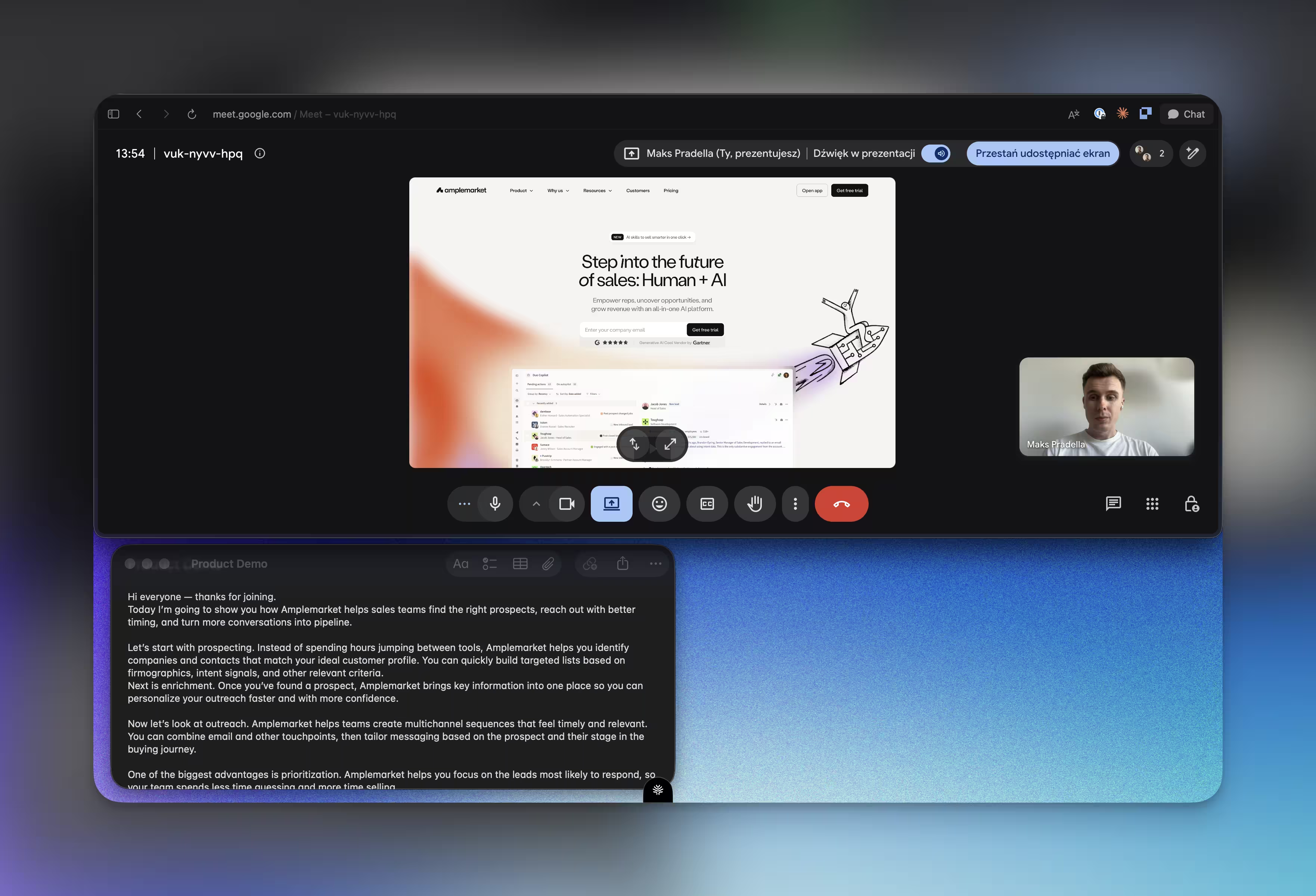
I kept looking down mid-pitch so I built a free teleprompter that scrolls inside the MacBook notch, right above the camera.
Published
Sep 5, 2026
Topic
Product
TL;DR Every video call, every recorded pitch, you look down to read your script and the audience feels it. I built Notchy so the script scrolls inside the MacBook notch, right above the camera. No floating windows. No looking away.
We’ve all been there
You already know the moment. Camera’s rolling, you’re two sentences into your pitch, and your eyes drop to the script sitting six inches below the lens.
For half a second you’re gone. Not talking to the viewer. Reading.
They notice. They always notice.
Eye contact is the whole transaction
Every video, every call, every recorded pitch runs on one currency: does this person seem like they’re talking to me or at a piece of paper. Break that once and the spell doesn’t fully come back. Break it every fourth sentence, which is what happens when you’re reading a script off a floating window, and you’ve built a habit your audience can feel even when they can’t name it.
I run calls, I record product walkthroughs, I pitch someone on video. I looked down in every single one of them.
Teleprompter apps exist. I tried four of them. Every one solved the words-on-screen problem and ignored the actual problem: the window still lives somewhere your eyes have to travel to. Top of screen, side panel, floating overlay. Doesn’t matter. The second your script isn’t at the camera, you’re back to looking away from it.
The dead space above your camera
Here’s the thing nobody uses: the notch. Every MacBook since 2021 has had this little black shape cut into the top of the screen, and it’s mostly just… there. A housing for the camera. Wasted pixels the OS won’t let you touch.
But wasted pixels sitting directly above the lens are the one piece of real estate on the entire screen where your eyes are already supposed to be.
That’s the whole insight. Not a new teleprompter feature. A new place to put the old one.
I spent about 4 days with SwiftUI figuring out how to render scrolling text inside that notch cutout without fighting macOS the whole way. It’s rough in places. I’ll say that upfront: this is early beta, and you will hit edges. But the core trick works. Your script scrolls right above the camera, and your eyes don’t have to leave the lens to read it.
What it actually does once it’s running
I didn’t want a teleprompter that also tried to be a script editor, a video tool, and a productivity suite. I wanted the smallest possible thing that solves the eye-contact problem and gets out of the way.
So it does a few things well:
- Scrolls where you look: text renders inside the notch, adjustable across Slow / Medium / Fast, plus a fine-tuned slider when presets aren’t precise enough
- Holds as many scripts as you need: create, edit, pin, search them instantly with ⌘K
- Imports what you already wrote: drop in a .txt, .md, or .rtf file instead of retyping
- Disappears from recordings: hidden from screen shares and video calls, so it’s invisible to everyone but you
- Tracks whether you’re actually improving: practice time, words delivered, pace, streaks
That last one wasn’t in my original spec. I added it after noticing I had no idea if I was getting faster or slower at reading naturally versus reading robotically. Turns out I wanted to know. You probably will too.
Free, open, yours to break
Notchy is MIT-open and sitting on GitHub. Not “open core,” not “free tier.” The whole thing.
I built this because I needed it, not because I saw a market gap worth defending. Every teleprompter app is either overpriced for what it does or bloated with features that have nothing to do with the one job: helping you read without looking like you’re reading. I’d rather more people who share that specific, small annoyance just have the fix.
If you hit a bug, open an issue. If you want a feature that isn’t there, open a PR. It’s beta. Rough edges are the deal we’re both making right now.
I made this because I was tired of looking away from my own camera. If that’s your problem too, it’s yours now.